
01 / TRIGGERS
Start with a signal.
A customer message. A scheduled check. An event in another app. Give each one a clear next step.
Build AI agents and workflows. Handle customer conversations.
Understand the results. All in one connected workspace.
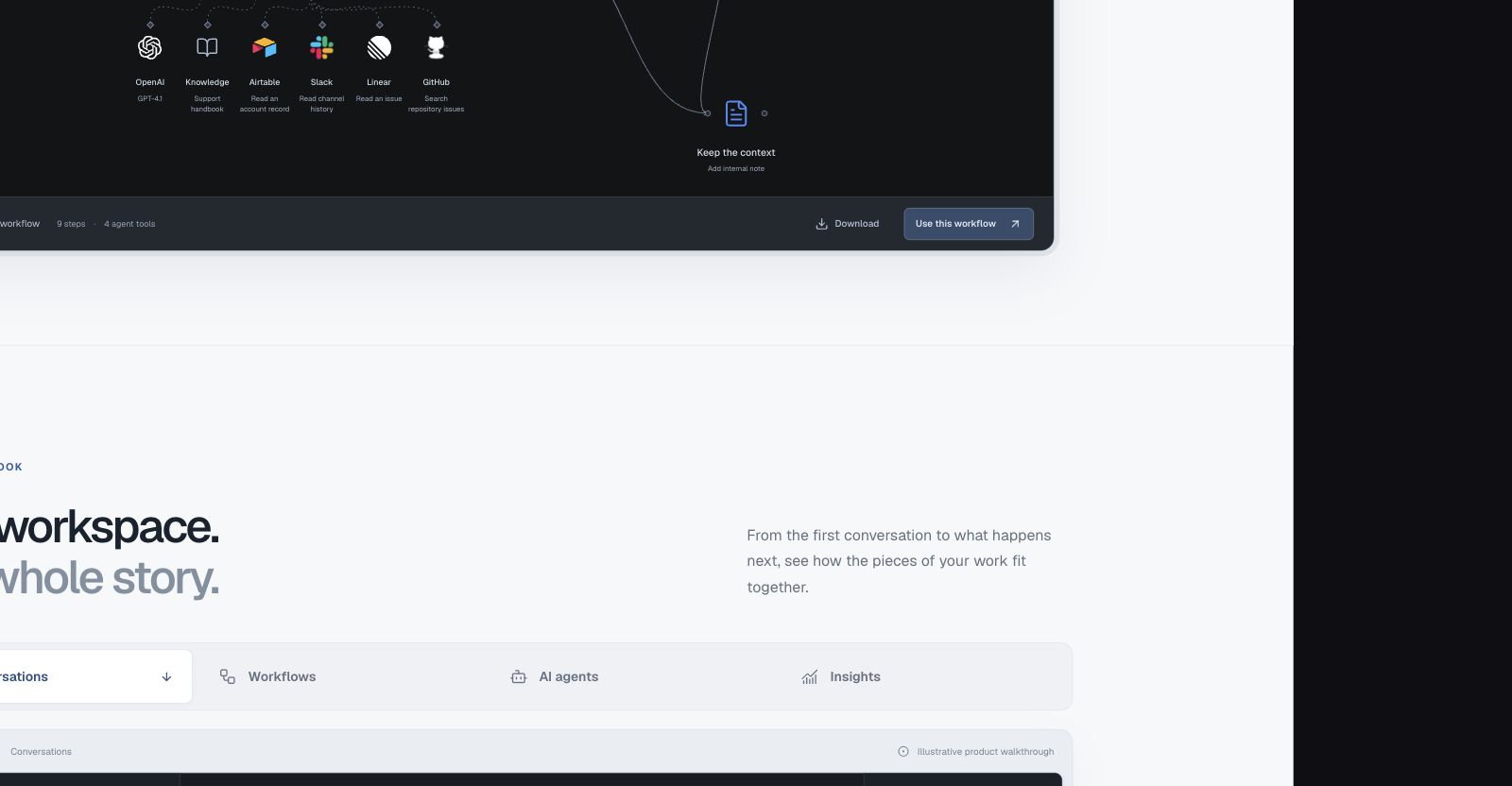
Find the account in Airtable. Let an agent make sense of the request. Bring in Slack, Linear, and your team when the next step needs them.
From the first conversation to what happens next, see how the pieces of your work fit together.
Customer email Example thread
Check the invitation status and confirm the address before sending another invite.
 LINKED ISSUEAccount invitation delivery
Keep the message, the customer context, and the next piece of work together. Pick up the thread without piecing the story back together.
 View full size
Turn a familiar process into a visible path. Connect triggers, decisions, and actions, with a place for people to review the work.
Turn the first message into a clear next step.
A defined role.
A visible review path.
Understand the customer's request. Identify the topic, find relevant context, and prepare the next action for the team to review.
 Find an issue
 Read a repository issueAsk for review
Define the instructions, choose the model, and connect the tools an agent can use. Keep its purpose and the path to human review in view.
Understand conversation volume.
Explore the time to a first reply.
Review service level outcomes.
Example shape only. Your reports use your workspace data.
Use a reporting period to understand changes in the queue, then inspect the work behind them.
Observe. Investigate. Improve.Look at the shape of incoming work, response times, and service levels. Use the same workspace context to decide where to look closer.
From a simple rule to a process with a dozen moving parts. Give every event a path, every agent a purpose, and every decision a way to be reviewed.
Explore NodeHub AutomationA customer message. A scheduled check. An event in another app. Give each one a clear next step.
Bring your model, knowledge, and selected operations into the same workflow.
Ask for approval before the next action. Give your team an explicit place in the process.
Conditions and AI decisions route each request to the next appropriate action.
Inspect workflow runs and step results. Follow the work back to what actually happened.
Use supported service actions, HTTP requests, and agent tools to connect the work.
Keep workflows organized in projects, from your first automation to the ones the whole team relies on.
Your customer should not have to repeat themselves. Your team should not have to piece the story together. Keep conversations, customer context, and follow-up work in one place.
 The customer
Keep help content and agent knowledge close to the conversations that need them.
Explore knowledgeGroup workflows into projects. Give your team a clear place to find and improve the process.
Explore projectsOrganize the request, see the customer, and keep the next action connected to the conversation.
Explore the inboxConnect an agent to the knowledge and tools it needs. Choose its model, define the job, and decide where a person should step in.
Explore AI agentsChoose from the models available through your AI accounts. Change the setup as the work changes.
Choose your modelConnect published knowledge so the agent has something useful to work from, beyond a prompt.
Connect knowledgeConfigure operations and MCP tools, set run limits, and inspect the results in your workflow.
Agent setup guideBring volume, response patterns, workload, and customer activity into view. Follow the numbers back to the conversations and processes behind them.
Explore operational insightsRoute incoming requests, bring in the right person, and keep follow-up work connected to the conversation.
Connect an event to the tools and approvals needed to get the next piece of work done.
Give an agent a defined job, selected tools, and a clear place in a process your team can inspect.
Your work already spans services. Bring their supported actions into the same workflow, alongside your customer conversations and AI agents.






































































































































































































































































































































































































































































































































































































































































































































































































































































































































































































































































































A conversation is rarely the whole job. There is a decision to make, someone to involve, a tool to update, and an outcome to understand. NodeHub gives that work a shared home.
Customer conversations
Rules, agents, and people
Connected workflows
Operational insights
The essentials about support, automation, and AI in NodeHub.
NodeHub brings visual workflow automation, AI agents, and customer support into one workspace. Teams can handle conversations, automate the work around them, manage follow-up tasks, and review operational insights without rebuilding the customer context across separate systems.
Both. The support workspace includes conversations, customer records, tasks, knowledge, and reporting. The workflow builder connects events, decisions, approvals, and tools. You can automate a support process or build a workflow that starts outside the inbox.
Build workflows for ticket routing, classification, follow-up tasks, approvals, and actions in connected services. Workflows can start from ticket events, webhooks, schedules, or a manual run. The available actions depend on the services and credentials you configure.
Yes. Configure an AI account and select a model available through that account. Give each agent instructions, connect knowledge and tools, and set run limits. Provider access and model availability depend on your configured account.
Yes. Add an approval step to a workflow where human judgment is needed. Your team can review that step before the workflow follows its approved or rejected path.
NodeHub includes a connection catalog for supported services, plus HTTP actions and MCP tools for configured agents. Each connection needs the appropriate account permissions and credentials. Check the catalog for the operations supported by a particular service.
Yes. Preview an n8n workflow JSON export or supported Plain support-data batches before applying an import. Review any unsupported steps or mappings, reconnect the required accounts, and verify the results. Imported workflows stay disabled until testing and human approval are complete.
Support insights cover conversation volume, response and resolution patterns, workload, customer activity, labels, channels, and product issues. Workflow run history provides step-level results. Available metrics reflect the activity recorded in your workspace.
No. Start with the part of the workspace you need. Workflow setup is optional, and you can return to it later. Add agents, connections, and review steps as your process grows.
Powerful automation. Customer support, built in.
Get started with NodeHubStart with Desk, Automation, or both. Find the right starting point for your team.
 Notify the team