Documentation
Start with the work you need to do.
Set up your support workspace, build your first workflow, or connect the two. Choose a starting point and keep the first test small.
Product preview: workspace access opens at launch. Follow the launch.
Your first working workflow
Connect an account, choose an action and inspect a test run. Follow the quickstart from an empty draft to a result you can verify.
Get started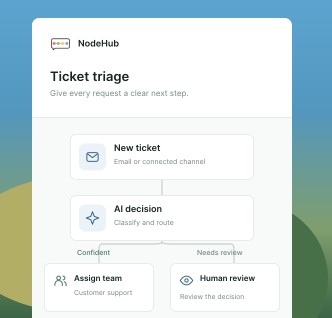
Work with your model provider
Bring your own account. Model availability and usage charges follow your provider.

OpenAI
Choose a verified account and model for a focused agent task.
Build an agent
Anthropic
Set up your account and check its available models before testing.
Connect an account
Azure
Use a configured Azure model account with the same agent tools and approvals.
Explore agent setupChoose your starting point
Start with Desk.
Connect a support channel, bring in a test request, and follow the conversation through assignment and reply.
Desk quickstartStart with Automation.
Open a workflow draft, configure its trigger and actions, then inspect a controlled test before publishing.
Automation quickstartGuides and resources
Connections
Connect a provider account, understand verification, and select the right account for an action.
Connect an accountData tables
Create typed records, import a CSV, and read or update shared business data in a workflow.
Work with data tablesVariables
Reuse a URL, team ID, or other non-secret setting across workflows in the same business.
Set up variablesAgents
Choose a model, define a focused task, select tools, and test a published agent with clear limits.
Build a focused agentStorage
Keep private files in buckets with version history, then use them from workflows, agents and tickets.
Store your filesAPI reference
Read recent tickets and create customer requests from your own backend, with scoped keys and safe retries.
Connect your applicationPlans & billing
Understand products, member pricing, checkout, and subscription management.
Understand your planBefore you begin
New to NodeHub? Set up your account and workspace, or sign in to the workspace your team invited you to. Plans and billing explains Support, Workflows, NodeHub, and choosing a member count for your team.
Administrators configure channels, connections, AI accounts, and workflows. Your role determines which controls you can use.
Use a test account and test records for your first provider actions. A connected service can change real data when you run a write operation.
Connect an account, then choose an operation.
The connection catalog lists services and setup information. A catalog entry is not a connected account. Supply the appropriate credentials in your workspace and check the server's verification result before adding an action.
If a connection fails, check the provider's permissions, account access, and credential status. Each service exposes its own set of operations.
Add AI where the job calls for it.
Open AI > Models to configure an AI account and select an available model. Give an agent explicit instructions, selected knowledge and tools, and appropriate run limits. Model availability and charges depend on the configured provider account.
Use a human approval step before an action that needs review. An agent's instructions alone do not create an approval gate.
Explore agents and approvalsKeep the result visible.
Inspect workflow run history for step outputs and errors. For a support process, also confirm the resulting ticket state or reply. An action is complete when its intended result is confirmed, not simply when the editor saves.
Read about access and data handling